
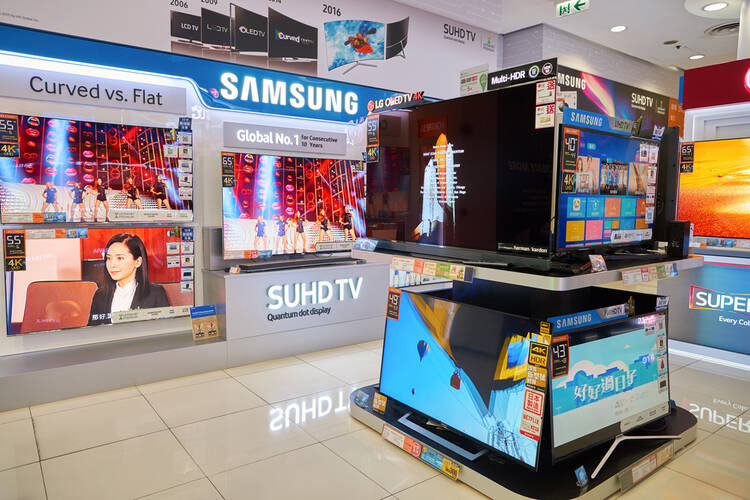
When it comes to electronic shop design, interior layout, and floor plan, it is important that the space is organized, customer-friendly, and visually appealing.
A well-planned layout ensures easy navigation, highlights popular or high-margin products, and creates an engaging shopping experience.
Consider using wide aisles, clear signage, and product displays at eye level to attract attention and encourage exploration.

Lighting plays a key role, with bright, focused lighting on key items and ambient lighting throughout the store to maintain a welcoming atmosphere.
Best Electronics Shop Design Ideas
-
Open Floor Plan
An open floor plan creates a spacious, welcoming environment where customers can move freely between product sections.
By minimizing barriers and walls, the store feels larger and allows shoppers to easily locate electronics categories.
Open layouts encourage browsing, improve sightlines for staff to monitor activity, and create opportunities for impulse purchases.
Clear zoning for different product types, such as computers, audio systems, and accessories, helps customers navigate efficiently.
Integrating flexible display units and movable shelving further supports seasonal promotions or new product launches, maintaining a dynamic and customer-friendly atmosphere.
-
Eye-Level Displays
Eye-level displays work best for high-margin or popular items, allowing customers to easily examine features and specifications.
Use tiered shelving, racks, or wall-mounted panels to organize products logically while maintaining accessibility.
Incorporate clear labeling and pricing information to assist customers in making informed decisions quickly.
For tech-heavy items, include interactive elements like demo units or touchscreen information panels.
Properly lit eye-level displays enhance visibility and draw shoppers into exploring adjacent product sections, boosting overall sales.
-
Interactive Demo Stations
Interactive demo stations allow customers to try products before purchasing, which is especially important for electronics.
Touchscreen devices, headphones, or VR setups give hands-on experiences that build confidence in product quality and functionality.
Strategically place demo stations near entrances or high-traffic zones to attract attention, but ensure they don’t block aisles.
Provide clear signage and staff guidance to help customers navigate the demo area.
Interactive displays also create opportunities for cross-selling complementary products, like accessories or warranties.
Well-maintained, sanitized demo stations reinforce a professional and trustworthy brand image while enhancing customer engagement and satisfaction.
-
Clear Signage and Wayfinding
Effective signage guides customers seamlessly through the store, reducing confusion and enhancing the shopping experience.
Use large, legible fonts, consistent color schemes, and strategically placed directional signs for product categories, checkout, and demo zones.
Include icons or images for clarity, especially for tech-savvy or international shoppers.
Signage should also highlight promotions, new arrivals, and featured products.
Digital screens can dynamically display product information and special offers.
Clear wayfinding not only improves customer satisfaction but also optimizes store flow, minimizes congestion, and allows staff to focus on assisting shoppers rather than directing them.
-
Modular Shelving and Display Units
Modular shelving provides flexibility to adjust layouts based on seasonal products, promotions, or changing inventory.
Units can be reconfigured to create new product zones, highlight featured items, or maximize floor space.
Modular displays allow layering of electronics and accessories efficiently while maintaining accessibility.
Use durable materials that support the weight of tech products and ensure safety. Combine shelving with integrated lighting to enhance product visibility.
Modular units also support visual merchandising strategies, making the store adaptable and responsive to market trends, customer preferences, and inventory changes without requiring costly renovations.
-
Dedicated Checkout Zones
Position counters where staff can efficiently manage transactions, returns, and inquiries.
Use multiple points of sale to handle peak traffic, and consider express lanes for small purchases. Include impulse-buy items near the checkout to boost last-minute sales.
Ensure that displays around checkout do not obstruct movement and that the area is well-lit and visually appealing.
Efficient checkout zones improve overall customer satisfaction, enhance perceived professionalism, and reduce waiting times, encouraging repeat visits and positive word-of-mouth recommendations.
-
Accent and Task Lighting
Lighting significantly affects both product visibility and store ambiance. Use bright, focused task lighting on shelves, displays, and demo stations to highlight key electronics.
Combine with softer ambient lighting to create a welcoming atmosphere. LED lights are energy-efficient and provide consistent illumination for detailed product inspection.
Accent lighting can emphasize promotional zones or new arrivals, attracting attention and guiding customers through the store.
Properly layered lighting enhances product presentation, improves shopper experience, and contributes to a professional, modern store aesthetic.
-
Color Schemes and Branding
Consistent color schemes reinforce brand identity and create a cohesive shopping environment.
Use colors that reflect the store’s logo, marketing materials, and digital presence.
Neutral backgrounds allow products to stand out, while accent colors highlight promotions, demo stations, or new arrivals.
Incorporating branded graphics or wall art enhances the store’s personality and memorability.
Thoughtful use of color also influences customer perception, evoking trust, energy, or sophistication depending on the target market.
A well-branded interior encourages repeat visits, creates a professional image, and supports marketing campaigns both in-store and online.
-
Technology-Integrated Displays
Integrating technology into displays enhances the shopping experience by providing additional product information and interactive features.
Touchscreens, QR codes, and augmented reality tools allow customers to explore specifications, watch tutorials, or compare products.
Smart shelving with digital price tags can update information automatically, saving staff time and reducing errors.
Technology-integrated displays also appeal to tech-savvy customers, reinforcing the store’s modern image.
These displays increase engagement, facilitate informed purchasing decisions, and differentiate the store from competitors who rely solely on static presentations.
-
Comfortable Customer Zones
Creating comfortable areas for customers, such as seating near demo stations or waiting areas, improves the shopping experience.
These zones encourage longer visits, allowing customers to test products at their own pace.
Providing charging stations, Wi-Fi access, or consultation desks enhances convenience, particularly for shoppers researching high-value electronics.
Comfortable zones also support families, business clients, and students, making the store more inclusive.
A welcoming environment reduces purchase anxiety, promotes interaction with staff, and increases the likelihood of additional sales and repeat visits.
-
Organized Inventory Storage
Efficient inventory storage ensures that products are readily available without cluttering the sales floor.
Use backroom shelving, bins, or racks to keep items organized by category, brand, or SKU.
Proper inventory management supports fast replenishment, prevents stockouts, and allows staff to assist customers quickly. Maintain clear pathways and label storage areas for staff efficiency.
Well-organized inventory also reduces the risk of damage, theft, or misplacement, contributing to smoother operations, better customer service, and higher profitability.
-
Seasonal and Promotional Displays
Highlighting seasonal items and promotions drives sales and attracts customer attention.
Use end-cap displays, tables, or digital signage to showcase new products, bundles, or limited-time offers. Change displays frequently to maintain a fresh shopping experience.
Seasonal promotions, such as back-to-school or holiday tech bundles, create urgency and encourage impulse purchases. Proper placement near entrances or high-traffic areas maximizes visibility.
Strategically designed promotional displays enhance marketing effectiveness, support sales goals, and create a dynamic, engaging environment that keeps customers returning.
-
Security Measures
Install surveillance cameras, mirrors, and electronic article surveillance (EAS) systems to prevent theft.
Secure storage for high-end or fragile items protects inventory and minimizes losses. Position staff to monitor activity near entrances, exits, and demo stations.
Visible security measures reassure customers while deterring potential theft.
Integrating security seamlessly into the layout ensures safety without detracting from the shopping experience, allowing customers to browse freely and staff to operate efficiently.
-
Efficient Traffic Flow
Design the layout to guide customers naturally through different product zones without congestion.
Use wide aisles, clear signage, and logical product grouping to facilitate movement.
Place high-demand items strategically to encourage exploration of adjacent sections.
Ensure demo stations, checkout areas, and promotional displays do not block pathways.
Efficient traffic flow improves customer satisfaction, reduces confusion, and increases the likelihood of multiple purchases.
A well-planned layout balances accessibility with strategic product placement, enhancing both sales and the overall shopping experience.
-
Accessibility and Compliance
Ensure the store is accessible to all customers, including those with disabilities.
Incorporate ramps, wide aisles, and accessible checkout counters to meet ADA standards. Use clear signage and ergonomic layouts for ease of navigation.
Compliance with building codes, fire regulations, and safety standards protects customers and staff while avoiding legal issues.
Accessibility features not only meet legal requirements but also demonstrate inclusivity, enhancing the store’s reputation and customer loyalty.